


Music for games isn’t too different from music in other media, although the difference lies in the possibilities that the medium presents to us. Games are non-linear in nature, meaning that the start, end and middle of a track can, at times vary and this is the essential aspect that makes music for games different to other forms of music.
This article will scratch the surface of what is available to game programmers when implementing music and how a composer can work towards some of these capabilities.
The first incredible capability of audio engines is the ability for the game to reorchestrate your piece of music. For this to occur, your music needs to be delivered in stems. Here is an example of the list of stems I created for the A-section of a piece of music.

I programmed the music (as a composer you aren’t expected to program anything!) so that the drums and bass would always play when the A-section played. All the other layers have a 50% chance of playing, meaning that each time the A-section played, it would be different! Sometimes the pizzicato, synth and cello would play, other times the piano and viola would play.
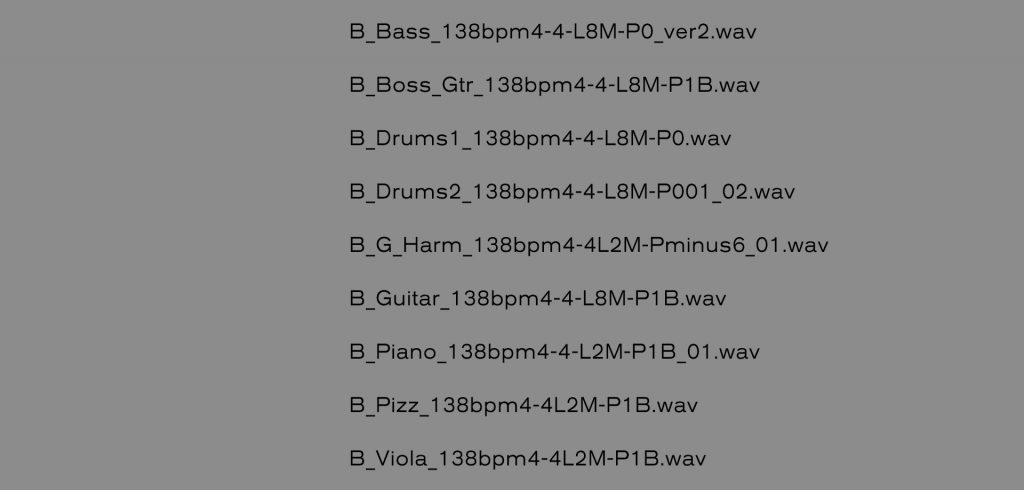
Another cool thing you can do is have variations of a part. Here is a list of the stems for the B section of the music. You can see that there are Drums1 and Drums2 stems. Each time the B section played, either one of these would be played at random, adding further variety to the section.
Here is a demo of interactive music that I composed, it is quite a simple project with A, B, C and D sections. The music begins with the D section but then cycles through the others randomly. The software we see in this video is Audiokinetic Wwise.
You can see in both the A and B sections that there is a stem labelled Boss_Gtr. As you may have already guessed, this layer plays only when your character is in the Boss section of the level. This is where the interactivity comes into it, and the sky’s the limit. You can have layers that will play when you are fighting, when you are in low health, when it is night-time, during the last 5 minutes of play, anything you can think of! Essentially, any parameter of the game can become a cue for the music to morph or change entirely.
So, what are some tips to go about achieving this in your DAW?
These images are from the composition session in Pro Tools.


A few pointers about the process for laying the session out, each section has its own tracks, for instance even though the drum sound is the same for each section, there are individual tracks for A_Drums, B_Drums, etc.
The same goes for effects, the piano has the same reverbs in each section, but there is a A_Piano_verb, B_Piano_verb and so forth. Separating everything out in this way helps enormously with the stem creation process later.
The other advantage to separating each section into discrete tracks like this is that you can easily shuffle the blocks around to trial different transitions. You will want to make sure the transition from A-B is as good as B-C as D-B and C-A.

For live instruments, you often find that the recording may begin slightly before the bar. If this is the case, render the stem exactly 1 bar before bar 1 (including silence). In the game engine software, if a stem has 1 bar of lead-up before bar 1 (and the software is told that this is the case), that stem will play 1 bar before that section begins. You can see in the image below the official start of the Section (green line) but several of the stems have audio information 1 bar ahead of the start time.

The same applies for the trailing out of a section, your B_Section might be 8 bars in length, but in order to create smooth transitions, you may want the last cymbal hit in the B_Section to ring out naturally while the next section starts. This is simply a matter of telling the game engine where exactly the supposed end of the section is, when the playback reaches that section, it will begin the next section but play the clips to the end of their run, including the cymbal fade-out.
The image below shows the set end point of the section in red, but you can see that several of the stems have a tail to their audio.

In the demo video, you will see that Sections appear to begin while the previous section is still playing out. Below is a screenshot indicating that the D_Transition and the D_Section appear to be playing simultaneously, but in fact, it is that the next section is playing its lead-out or that the previous section is playing the 1 bar lead-up.

Lastly, if you are contracted to compose for a game, ask for guidelines on how they want the stems to be named and attempt to diligently adhere to the naming convention. This becomes a big deal in larger projects. The stem names used in these examples look like a bunch of gibberish, but they include information that is helpful to the programmer/implementer.
For example, A_Guitar_138bmp4-4-L16M-P1B translates to A Section, Guitar, 138 beats per minute, 4-4 time, 16 measures in length with 1 bar of preamble. This is the naming convention used in the Wwise 201 interactive music tutorial and what I generally follow by default unless told otherwise. You can find the Wwise 201 tutorial here: https://www.audiokinetic.com/courses/wwise201/
Well, there you have it! It is a slightly different way of thinking about composing music, but a lot of your pre-existing composition talent will roll over smoothly into this new way of thinking. It is an incredibly exciting and different way to think about music and opens up a wide world of creative possibilities.

